Phone:
(+971) 56 921 3754
Physical address:
Office #201, Al Quoz Industrial Area
Dubai, United Arab Emirates.
Emergency Server Room Cooling
Server rooms and data centres require reliable cooling to protect servers, networking equipment, storage systems, and other critical IT infrastructure. When a precision air-conditioning system fails or requires planned maintenance, room temperatures can rise quickly, especially in facilities operating under heavy computing loads.
Server room temporary cooling rental provides a practical way to maintain cooling during equipment breakdowns, scheduled maintenance, capacity upgrades, and unexpected HVAC emergencies. Rather than waiting for the permanent cooling system to be repaired or replaced, businesses can deploy temporary cooling equipment to help maintain safe server inlet temperatures and reduce the risk of unplanned downtime.
In Dubai and across the UAE, emergency cooling planning is particularly important because high outdoor temperatures can increase the demands placed on cooling equipment. However, temporary cooling for a server room is not simply a matter of placing a portable air conditioner inside the room. The solution must account for IT heat loads, airflow distribution, temperature and humidity monitoring, redundant capacity, condensate removal, and the way warm air moves through the space.
This guide explains how temporary server room cooling works, when it is needed, how it supports a CRAC or CRAH unit failure, and what facility managers should consider when arranging emergency cooling.
What Is Server Room Temporary Cooling Rental?
Server room temporary cooling rental is the short-term provision of cooling equipment to maintain suitable environmental conditions in a server room, network room, data centre, or other IT facility while its permanent cooling system is unavailable or unable to meet demand.
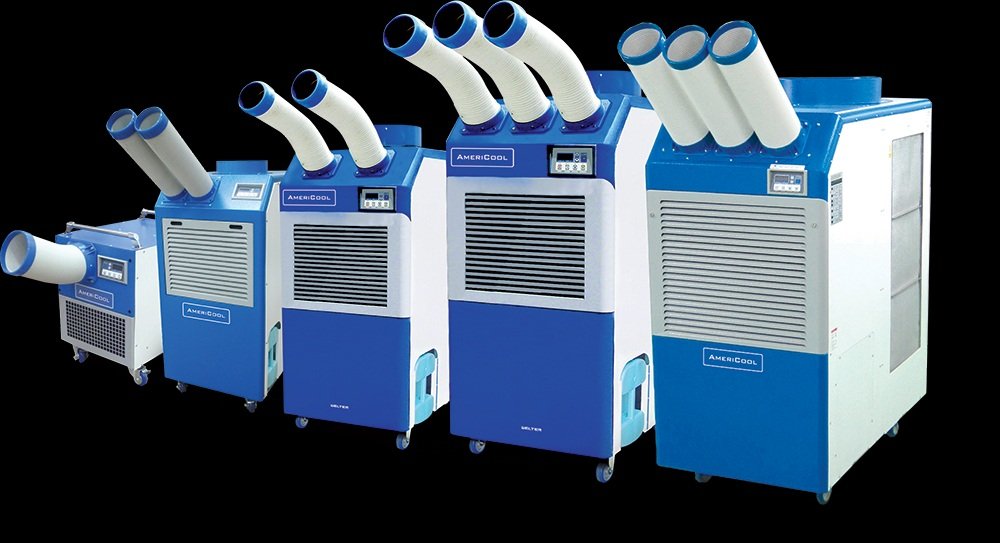
The equipment may include portable spot coolers, temporary air-conditioning units, ducted cooling equipment, or larger temporary HVAC systems. The appropriate choice depends on the room’s heat load, rack arrangement, available electrical supply, airflow requirements, and the duration of the cooling requirement.
The purpose is not merely to lower the room temperature. Temporary cooling must deliver enough conditioned air to the server inlets, remove the heat discharged by IT equipment, and maintain appropriate humidity conditions.
The American Society of Heating, Refrigerating and Air-Conditioning Engineers (ASHRAE) identifies computer room air-conditioning (CRAC) and computer room air-handling (CRAH) units as established solutions for data-processing environments. Its technical guidance also explains why airflow configuration and equipment placement matter when cooling IT spaces. Read ASHRAE’s data centre technical guidance.
Temporary cooling can be useful in several situations:
-
CRAC or CRAH failure: A primary cooling unit stops operating or cannot provide sufficient cooling.
-
Planned maintenance: Engineers need to service refrigeration equipment, fans, filters, pumps, or associated controls.
-
Cooling capacity upgrades: New racks or higher-density IT equipment increase the room’s heat load.
-
Unexpected cooling demand: Existing equipment struggles to maintain the required temperature during a period of increased server utilisation.
-
Temporary IT installations: A business needs cooling for a temporary server room, network cabinet area, or short-term technology project.
For critical environments, the solution should be selected by an experienced HVAC team in coordination with the data centre’s facilities and IT personnel.
Why Server Room Cooling Is Critical in Dubai and the UAE
Server equipment converts electrical energy into heat during operation. Processors, storage devices, networking switches, power supplies, and other components contribute to the overall thermal load. Without sufficient heat removal, the air entering the equipment can become too warm.
A rising temperature can cause servers to increase fan speeds, reduce performance through thermal throttling, or trigger protective shutdowns, depending on the equipment and operating conditions. A prolonged cooling interruption can therefore affect application availability, network services, business systems, and data access.
Dubai’s hot climate adds another consideration. Temporary cooling equipment must be selected for the actual outdoor conditions and installation arrangement, particularly when heat is rejected outside the building or when equipment is installed in an exposed service area.
The U.S. Department of Energy’s Best Practices Guide for Energy-Efficient Data Center Design explains how server heat loads, airflow patterns, and separation between hot and cold air affect cooling performance. These principles remain relevant when temporary equipment is introduced during an emergency.
For facilities looking for data center emergency AC Dubai services, the priority should be to restore adequate cooling at the equipment inlets, not simply to make the room feel cooler.
Thermal Thresholds: Keeping Server Inlet Air Between 18°C and 27°C
One of the most important considerations in server room temporary cooling rental is the temperature of the air entering the servers.
Recommended equipment inlet temperature for applicable air-cooled IT equipment classes. Follow equipment manufacturers’ specifications and the facility’s approved operating limits.
Why the server inlet temperature matters
The temperature measured at the room thermostat may not represent the temperature experienced by every server. For example, the upper racks in a cabinet may receive warmer air than lower racks because of airflow restrictions, hot-air recirculation, or insufficient cooling distribution.
A temporary unit can reduce the general room temperature while leaving a hot spot directly in front of a heavily loaded rack. This is why technicians should monitor conditions at representative rack inlets, including locations near the top, middle, and bottom where appropriate.
ASHRAE also distinguishes between recommended and allowable conditions. The allowable range indicates the environment in which particular equipment classes are designed to function; it does not mean that operating continuously near those limits is the best strategy.
Temperature is only one part of the requirement
Humidity and dew point also matter. Moisture conditions outside the recommended envelope can affect equipment reliability, and condensation creates an additional risk when cold surfaces come into contact with humid air.
Temporary cooling should therefore be selected and controlled with reference to:
-
Rack inlet temperatures and changes over time.
-
Relative humidity and dew point.
-
The server manufacturer’s environmental requirements.
-
Airflow distribution and equipment density.
-
Temperature and humidity alarms already configured in the facility.
Practical recommendation: Establish the facility’s acceptable temperature and humidity limits before connecting temporary equipment. Do not rely on a single room sensor or set the cooling system to an unnecessarily low temperature.
CRAC Unit Failure Backup: How Temporary Cooling Supports Critical IT Rooms
A CRAC unit is a computer room air conditioner designed for the environmental demands of IT spaces. A CRAH unit is a computer room air handler, commonly used with a chilled-water cooling system. Both can be part of a facility’s primary cooling arrangement.
A failure may result from a compressor fault, fan failure, control issue, loss of chilled-water flow, refrigeration problem, or another mechanical or electrical fault. The cause determines which parts of the cooling system remain available and how a temporary solution should be connected.
A well-planned crac unit failure backup arrangement aims to maintain sufficient cooling while the faulty unit is diagnosed, repaired, or replaced.
Rapid temporary cooling deployment
A typical response follows a controlled sequence.
1. Assess the cooling failure. Facilities engineers identify the affected equipment, confirm the status of any remaining cooling units, review alarms, and determine how quickly rack inlet temperatures are changing.
2. Calculate the cooling requirement. The team assesses the IT electrical load, existing cooling capacity, equipment density, room layout, and any additional heat sources. Electrical demand can provide a useful initial estimate of IT heat generation, but the assessment must account for actual operating conditions and other room loads.
3. Select the temporary cooling equipment. Capacity, sensible cooling performance, airflow, external heat rejection, electrical compatibility, and installation restrictions must all be considered.
4. Install the equipment and establish airflow. The installation team positions cooling outlets to serve the affected equipment, provides a suitable exhaust or heat-rejection route, and checks that warm air cannot readily return to the cold-air supply.
5. Verify performance. The team monitors server inlet temperatures, humidity, condensate drainage, alarms, and equipment operation. The temporary setup should be adjusted if monitoring reveals uneven cooling.
6. Maintain cooling until the permanent system is restored. Operators continue monitoring the environment, coordinate the repair, and plan a controlled transition back to the permanent cooling system.
The U.S. Department of Energy’s data centre design guide provides useful background on airflow management and thermal performance in IT environments.
How N+1 redundancy works during maintenance or failure
N+1 is a redundancy arrangement in which the installed system has one additional capacity unit beyond the number required to meet the design load. If a system needs N units to meet demand, the additional unit is intended to allow the required load to be supported when one unit is unavailable, subject to the system’s design and operating conditions.
ASHRAE discusses redundancy as a way to support reliability and concurrent maintenance, while warning that redundant equipment alone does not guarantee reliable operation. Shared electrical supplies, controls, pumps, or other common components can still create single points of failure. Source: ASHRAE Handbook, redundancy and reliability.
Temporary cooling can help bridge a gap when permanent capacity is unavailable, but it should not automatically be treated as equivalent to a fully engineered N+1 system.
For example, if one cooling unit is removed from service for planned maintenance, a temporary unit may provide supplementary capacity while the permanent system continues to operate. For an unexpected failure, temporary cooling may be deployed to support the remaining units while the failed equipment is repaired.
In either case, engineers should check the entire cooling path, including power supplies, heat rejection, controls, condensate drainage, and airflow. The temporary unit must also be suitable for continuous operation for the required duration.
Choosing the Right Temporary Cooling Equipment for a Server Room
Not every air-conditioning unit is suitable for an IT environment. A domestic portable AC may provide cooling for a small office, but a server room often has a high, continuous sensible heat load and stricter requirements for airflow, humidity, and uninterrupted operation.
The appropriate solution depends on the size of the installation and the nature of the cooling failure.
| Cooling option | Potential application | Main consideration |
|---|---|---|
| Portable spot cooler | Small server rooms, network closets, or localised hot spots | Confirm capacity, continuous-duty suitability, and hot-air exhaust routing |
| Temporary commercial AC | Small to medium IT rooms or supplementary cooling | Verify actual sensible cooling capacity and airflow |
| Ducted temporary cooling | Rooms where cold air must be delivered to specific racks or zones | Check duct pressure, airflow balance, and return-air routing |
| Larger temporary HVAC system | Larger server facilities or substantial cooling outages | Requires detailed load assessment, suitable connections, and coordinated installation |
The table provides general selection guidance, not a substitute for an engineering assessment. A large data centre may require a purpose-designed temporary system rather than portable equipment.
How much cooling capacity is required?
Cooling capacity should be based on the actual heat load, not floor area alone.
For example, if IT equipment consumes 20 kilowatts of electrical power, approximately 20 kilowatts of that power will ultimately become heat in the room under steady operating conditions. Additional heat sources, such as lighting, people, power equipment, and heat entering through the building envelope, may increase the overall cooling requirement.
The design must also account for airflow and the difference between the temperature of supply air and return air. Two units with similar advertised cooling capacities may perform differently under actual operating conditions.
Before selecting a rental system, facility managers should establish:
-
The current IT electrical load and expected operating load.
-
The cooling capacity still available from the permanent system.
-
The required duration of the temporary installation.
-
The available electrical supply and connection arrangements.
-
The route for removing heat from the building.
-
The required supply airflow and distribution across server racks.
This information helps prevent undersizing, unnecessary overcooling, and deployment delays.
Managing Heat Exfiltration and Airflow in Sealed IT Rooms
A server room can have a relatively airtight enclosure, but this does not mean its heat will disappear. Servers continuously draw in air and discharge warmer air. If that warm exhaust mixes with the cooling supply, the effective cooling performance can fall.
Heat exfiltration in this context refers to warm air or heat escaping from its intended containment area into adjacent spaces. During temporary cooling, uncontrolled air movement can also allow warm air to recirculate back into server intakes.
The U.S. Department of Energy explains that separating hot and cold air streams is a key part of effective data centre cooling. Its Best Practices Guide for Energy-Efficient Data Center Design discusses hot-aisle and cold-aisle arrangements, sealing cable openings, and preventing recirculation.
Maintain hot-aisle and cold-aisle separation
In a typical rack arrangement, servers draw cool air through their front-facing inlets and release warm air from their rear exhausts. This arrangement creates cold aisles at the rack fronts and hot aisles at the backs.
Temporary cooling should preserve this airflow pattern wherever practical.
Cold air should reach the server inlets without being obstructed by equipment, cables, temporary ducts, or poorly positioned cooling units. Meanwhile, hot exhaust air should have a clear return path or be directed towards the designated heat-removal system.
Where a containment system already exists, temporary installation should avoid creating openings that allow hot and cold air to mix. Unused rack spaces and unnecessary cable openings should remain appropriately sealed.
Plan supply and return airflow together
Introducing a high-capacity cooling unit does not guarantee effective cooling if its airflow is poorly directed. A unit may cool one part of the room while leaving other racks exposed to warmer air.
The installation team should therefore evaluate the direction of supply air, the return-air path, and the location of temperature sensors. Where ducting is necessary, its length, diameter, pressure losses, and routing should be compatible with the equipment’s fan performance.
In a sealed IT room, a temporary system must also be checked for pressure imbalances. Some portable air conditioners discharge hot exhaust air outdoors and may draw replacement air from the room. Depending on the configuration, this can create negative pressure and draw warm, humid, or unfiltered air through gaps.
Important: Never discharge the temporary unit’s hot exhaust into the same sealed server room that it is intended to cool. The heat must be rejected outside the conditioned space or through an appropriately designed heat-rejection arrangement.
Condensate Water Disposal: Protecting IT Equipment During Temporary Cooling
Air-conditioning equipment removes moisture from the air when its cooling coil operates below the air’s dew point. This moisture collects as condensate and must be managed safely.
In a server room, condensate management is particularly important because water leakage can damage electrical equipment, create slip hazards, and interrupt operations.
Temporary equipment may use an internal collection tank, a continuous gravity drain, or a condensate pump. The correct arrangement depends on the equipment design and the available drainage facilities.
Why internal water tanks can be unsuitable for continuous operation
A collection tank can be practical for short-duration use, but it has a limited capacity. If the tank fills, a unit may stop automatically or trigger an alarm, depending on its design.
For a critical IT room requiring continuous cooling, an unattended tank may introduce an avoidable failure point.
Where the equipment supports it, a properly installed continuous drain or condensate pump may be more appropriate. The drainage arrangement should be designed and tested before the cooling system is relied upon.
Best practices for condensate disposal
A suitable installation should include the following precautions:
-
Route condensate to an approved drainage point or suitable collection system.
-
Confirm that drain hoses are correctly sized, secured, and protected from kinks.
-
Check that gravity drainage has the required slope.
-
Where a pump is used, verify its capacity, discharge route, and alarm arrangements.
-
Keep connections away from servers, electrical distribution equipment, and sensitive floor areas.
-
Inspect for leaks during commissioning and continue monitoring throughout operation.
-
Establish a response plan for drain blockage, pump failure, or condensate alarms.
In a sealed IT room, the drainage route should be agreed with the facilities team before equipment is positioned. Temporary hoses should not obstruct access routes or create trip hazards.
ASHRAE’s data centre environmental guidance also emphasises environmental control, including temperature, humidity, and dew-point considerations. Condensate management is one part of maintaining a stable environment around sensitive equipment.
Electrical Supply and Backup Power for Temporary Cooling
Temporary cooling equipment requires a reliable electrical supply. During an HVAC failure, the facility may still have power to its servers but lack the additional electrical capacity needed to operate temporary cooling equipment.
This issue should be assessed before deployment. The team needs to confirm the required voltage, phase, current, circuit protection, starting demand, and connection method for the selected units.
If the cooling equipment depends on a separate generator, its capacity must account for the combined electrical load, including motor starting characteristics and other connected equipment.
For facilities that need temporary power alongside emergency cooling, prime power diesel generators may be worth assessing as part of a coordinated backup-power arrangement.
However, a generator does not automatically make a temporary cooling setup resilient. The installation must account for fuel supply, electrical distribution, grounding, ventilation, exhaust routing, and the consequences of a generator or cooling-unit failure.
The cooling and power arrangements should be reviewed together so that a solution intended to protect IT equipment does not introduce another single point of failure.
When Should a Business Arrange Data Centre Emergency AC in Dubai?
Temporary cooling should ideally be planned before a cooling emergency occurs. Facilities teams can identify connection points, estimate loads, confirm equipment access, and establish procedures for bringing in backup equipment.
Common situations that may require emergency cooling include:
Unexpected CRAC or CRAH failure. A cooling unit stops operating, and the remaining equipment cannot maintain the required conditions.
Planned HVAC maintenance. A cooling unit must be taken out of service for inspection, repair, or component replacement.
Chiller or chilled-water problems. A CRAH system loses some or all of its chilled-water supply, reducing the air handler’s ability to remove heat.
Expansion of IT infrastructure. Additional racks, servers, or high-density computing equipment increase the heat load beyond the available cooling capacity.
Cooling-system replacement. Temporary cooling is needed while permanent equipment is removed, installed, tested, or commissioned.
Unexpected high temperatures. Existing cooling equipment cannot maintain the approved operating limits during unusually demanding conditions.
In each situation, the response should be based on actual environmental readings and the available cooling capacity. If temperatures are rising rapidly, facilities personnel should follow the site’s approved incident-response procedures while arranging qualified technical support.
How to Arrange Server Room Temporary Cooling Rental in Dubai
For a business seeking rental AC in Dubai, an effective rental process begins with a clear technical assessment.
The following steps can help facility managers prepare the necessary information.
Step 1: Describe the IT environment
Provide the number of racks, approximate electrical load, room dimensions, cooling configuration, and any known hot spots. Identify whether the facility uses CRAC units, CRAH units, chilled-water cooling, or another arrangement.
Step 2: Explain the failure or maintenance requirement
Clarify whether the requirement is an emergency response, a planned maintenance window, additional capacity, or temporary support during a permanent system upgrade.
Step 3: Confirm site access and installation restrictions
Identify available electrical supplies, external heat-rejection routes, permitted duct openings, drainage facilities, and any building or security requirements.
Step 4: Agree on the temporary cooling design
The HVAC provider and facility team should establish the required cooling capacity, supply-air distribution, heat-rejection arrangement, condensate disposal, monitoring method, and deployment sequence.
Step 5: Test and monitor the installation
Before relying on the temporary equipment, verify that it operates correctly under the expected load. Check rack inlet temperatures, humidity, airflow, drainage, electrical connections, and alarms.
Step 6: Plan the return to permanent cooling
Once the original system has been repaired or replaced, coordinate the transition carefully. Remove temporary equipment only after the permanent cooling arrangement has been tested and the facility team has confirmed that conditions are stable.
For commercial requirements, rental AC in Dubai is the relevant service page to review when assessing temporary air-conditioning options.
The equipment provider should confirm actual availability, cooling specifications, delivery arrangements, and installation requirements for the particular site rather than assuming every rental unit is suitable for server-room use.
Benefits of Temporary Server Room Cooling Rental
Temporary cooling offers several operational advantages when it is appropriately specified and installed.
Reduced exposure to overheating: It can provide additional cooling capacity while permanent equipment is unavailable, helping protect servers from excessive inlet temperatures.
Support during planned maintenance: It can help facilities teams maintain environmental conditions while servicing a primary cooling system.
Flexible capacity: The equipment can be selected for a specific temporary requirement rather than permanently expanding the installed cooling system.
Potentially faster recovery: Pre-arranged equipment and an agreed deployment plan can reduce the delay between identifying a cooling problem and restoring adequate heat removal.
Support for business continuity: Maintaining acceptable environmental conditions helps reduce one important source of operational risk, although it cannot guarantee uninterrupted IT services.
Scalable response: Depending on site conditions and equipment availability, a temporary arrangement may support a single rack, a small server room, or a larger facility.
These benefits depend on correct sizing, suitable equipment, proper installation, and continued monitoring. Temporary cooling should complement the facility’s business continuity and disaster recovery plans, not replace them.
Common Mistakes to Avoid When Renting Temporary Server Room Cooling
A temporary installation can underperform if it is selected or positioned without considering the IT environment.
One common mistake is choosing equipment based only on room size. Server heat loads vary significantly, so the cooling requirement must be calculated from the actual equipment and operating conditions.
Another is measuring only the room temperature. Rack inlet conditions can differ from the temperature recorded by a wall-mounted thermostat. Monitoring should cover representative equipment inlets.
A third mistake is ignoring hot-air exhaust. If the heat removed from the room is discharged back into the same space, the system may fail to provide useful net cooling.
Facilities should also avoid using undersized equipment, relying on collection tanks that require frequent emptying, overlooking electrical supply limitations, or introducing uncontrolled airflow through a sealed room.
Finally, temporary cooling should not be assumed to provide full redundancy simply because an additional unit is present. The entire system must be assessed, including power, controls, airflow paths, drainage, and heat rejection.
Frequently Asked Questions
What is server room temporary cooling rental?
Server room temporary cooling rental is the short-term provision of air-conditioning or specialised cooling equipment to maintain suitable temperatures around servers and networking equipment during HVAC failures, maintenance, or periods of additional cooling demand.
What temperature should a server room maintain?
ASHRAE’s recommended inlet-air temperature range for applicable air-cooled IT equipment classes A1 through A4 is 18°C to 27°C. Individual equipment specifications and facility operating policies should also be followed. The temperature measured at a server inlet is more useful than relying on a single room reading.
Can a portable AC unit cool a server room during a CRAC failure?
It may be suitable for a small server room or a localised cooling requirement, provided it has sufficient capacity, appropriate airflow, safe heat rejection, suitable electrical connections, and reliable condensate management. Larger or high-density IT environments may require specialised temporary cooling equipment.
What does N+1 cooling redundancy mean?
N+1 means providing one additional capacity unit beyond the number required to meet the design load. It can support maintenance or a single-unit failure when the system is correctly designed, but it does not automatically guarantee redundancy across power, controls, pumps, and other supporting infrastructure.
How do you prevent warm air from returning to server inlets?
Maintain the intended hot-aisle and cold-aisle arrangement, provide a suitable warm-air return path, seal unnecessary openings, and position temporary supply ducts to serve the rack inlets. Temperature measurements at multiple rack heights can help identify recirculation and uneven cooling.
How should condensate water be handled in a sealed server room?
Condensate should be directed through a secure, appropriately sized drain or a suitable pump-and-drain arrangement where the equipment supports it. Drainage should be tested, monitored, and positioned to prevent leaks near IT and electrical equipment.
Is temporary cooling suitable for continuous operation?
Some rental equipment is designed for extended or continuous operation, while other units may have limitations. Confirm the manufacturer’s duty rating, environmental operating limits, maintenance requirements, drainage arrangements, and monitoring provisions before using equipment for an extended period.
What information is needed to request emergency AC rental in Dubai?
Useful information includes the server-room location, IT electrical load, room dimensions, existing cooling system, current fault or maintenance issue, required deployment period, available power, and condensate drainage options. This helps the provider assess the correct equipment and installation requirements.
Conclusion:
Server room temporary cooling rental can provide important support during CRAC or CRAH failures, scheduled maintenance, cooling upgrades, and unexpected increases in IT heat load. However, protecting critical equipment requires more than installing an air conditioner and lowering the thermostat.
A reliable approach starts with the actual IT heat load, follows ASHRAE’s recommended environmental guidance, preserves the separation between hot and cold air, and includes safe heat rejection, electrical planning, condensate disposal, and continuous monitoring.
For businesses in Dubai and across the UAE, preparing a temporary cooling plan before an emergency can make deployment more orderly and reduce avoidable delays. Coordinate the cooling requirement with qualified HVAC personnel and the facility’s IT team to ensure that the proposed system is appropriate for the room and the duration of the outage.
Explore rental AC in Dubai for temporary air-conditioning requirements, and review prime power diesel generators if the project also requires a separately assessed temporary power supply.
Need Reliable Temporary Power or Cooling in the UAE?
From 20 kVA mobile silent generators up to multi-megawatt synchronized power plants and 500 TR packaged chillers. Complete turnkey delivery, cabling, and 24/7 on-site maintenance across Dubai, Abu Dhabi, and Sharjah.